BSR Tracking and PAT Targeting: A Seller's Guide to CentralDesk's Newest Tools
BSR and PAT: Two Acronyms Every Amazon Seller Should Understand
If you sell on Amazon, you've definitely seen the letters "BSR" thrown around, and if you run PPC campaigns, you've probably scrolled past "Product Attribute Targeting" without giving it much thought. Let's fix that. Both of these things matter a lot more than their boring acronyms suggest, and once you get comfortable with them, they'll change how you think about ranking and advertising.
Best Sellers Rank (BSR) is Amazon's way of telling you how a product is selling relative to everything else in its category. Lower is better. A BSR of #12 means your product is the 12th best-selling item in that category, and a BSR of #45,000 means, well, there's some work to do. Here's the part people miss: BSR exists at the root category level (like "Home & Kitchen") and at every subcategory level underneath it (like "Coffee Makers" or "Espresso Machines"). The root-level number looks impressive on a listing, but it's the subcategory rank that tells you something useful, because that's the rank shoppers and Amazon's algorithm care about when it comes to visibility within the niche you're competing in. Tracking BSR as a single number on a single day is fine, but on its own it doesn't tell you much. What you really want is the trend. Is your rank climbing after a price change? Did it slip after a competitor launched? A snapshot tells you where you are. A history tells you why.
Product Attribute Targeting (PAT) is a PPC targeting mode that lets you target specific ASINs or entire product categories instead of keywords. Instead of bidding on "espresso machine" and hoping the right shoppers type that phrase, you can say "show my ad on this exact competitor's product page" or "show my ad anywhere in the espresso machine category." It's a fundamentally different way of reaching shoppers, because you're not chasing search intent, you're placing your product directly in front of people who are already looking at something adjacent to yours.
Why PAT Deserves a Real Spot in Your PPC Strategy
A lot of sellers treat PAT as an afterthought bolted onto a keyword-first strategy. That's a missed opportunity. PAT lets you show up in places keywords simply can't reach: on a competitor's product detail page, tucked into a related category carousel, or in front of a shopper who's already mid-decision and comparing options. That shopper isn't typing a search query anymore. They're browsing, comparing, and deciding, and PAT is how you get in front of them at exactly that moment.
Think of it as complementary to keyword targeting rather than a replacement for it. Keywords catch intent (someone actively searching for what you sell). PAT catches context (someone already in the right shopping mindset, just looking at the wrong product). You need both to cover the full picture.
There's also a defensive angle that's easy to overlook. Running PAT campaigns on your own product pages means when a competitor tries to poach your shoppers with their own ads, you're right there too, protecting the sale you already earned. Without that defensive layer, you're handing free real estate on your own listing to whoever bids for it.
PAT campaigns can also surface demand that keyword research never would. Two products can be frequently bought together or browsed together without sharing a single meaningful keyword. That connection only shows up in shopping behavior, not in search terms, so if you're only doing keyword research, you're missing it entirely.
Bottom line: if you're skipping PAT, you're leaving a meaningful chunk of Amazon's ad inventory completely untouched. That's inventory your competitors are happy to pick up instead.
So Why Doesn't Everyone Nail PAT? Because It's Genuinely Hard
Here's the honest problem. PAT sounds simple in theory (just pick some ASINs to target) but Amazon has hundreds of millions of ASINs. Picking good targets by hand isn't just tedious, it's basically impractical once your catalog grows past a handful of SKUs.
The best signal for choosing PAT targets is Market Basket data, meaning what customers buy together with your product. This is genuinely great data. The problem is Amazon doesn't surface it anywhere clean or usable in Seller Central. It exists, but you're not getting a tidy dashboard of it.
Even if you already have PAT campaigns running, figuring out whether they're working requires digging across several different report views, cross-referencing spend against sales against impressions, and stitching it all together yourself.
Then there's the question of finding weaker competitors, meaning products that are genuinely good targets because they represent a real conversion opportunity for you. That requires combining BSR data with your own product's ratings and category position, which isn't something you can eyeball from a single Amazon page.
And at scale, things get messier. Big catalogs are full of near-duplicate listings (the same item in different pack sizes or minor variations), which dilutes any single-product signal. A competitor might be a genuinely strong target across their whole product line, but if you're only ever looking at one of their listings at a time, they'll never look dominant enough to catch your attention. The signal is there, it's just scattered.
This Is Exactly What CentralDesk Built BSR Tracking and PAT Tools to Solve
We built CentralDesk's BSR tracking and PAT analysis tools because we kept running into these exact problems ourselves: messy signals, scattered reports, and no easy way to see which targets mattered most. So we pulled the important data into one place, did the cross-referencing for you, and surfaced the recommendations that matter. Here's how each piece works.
Feature Walkthrough
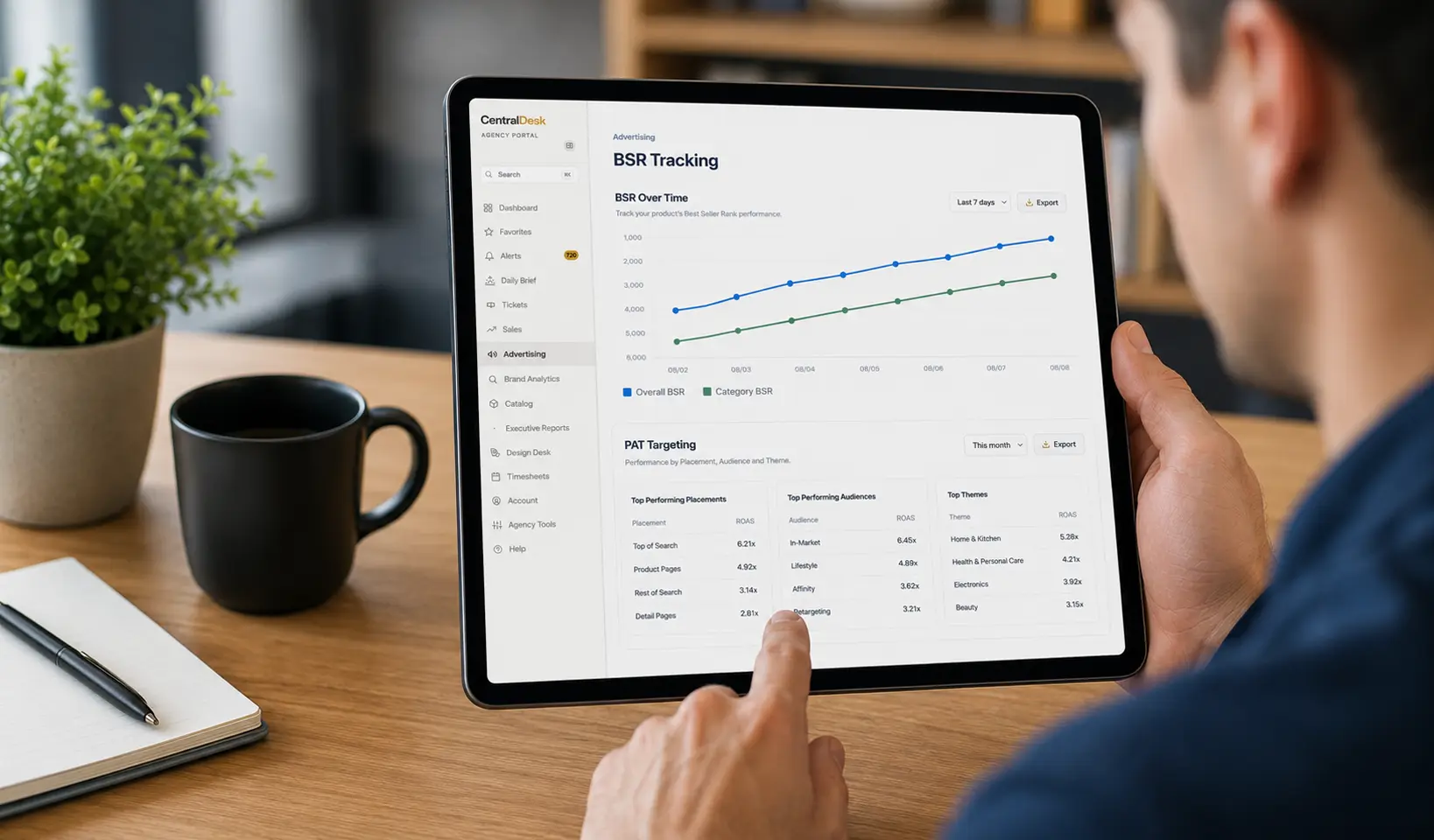
BSR Tracking (Catalog > BSR Tracking)
- Shows every BSR category your product qualifies for, along with your current rank in each one.
- You pin ONE category per product, ideally the most relevant subcategory, so you're tracking the number that matters most instead of drowning in every category Amazon happens to file you under.
- The first category you pin becomes your account default. Any other product that also qualifies for that category automatically inherits it, so you're not re-configuring the same choice over and over.
- Rank gets captured daily, which builds a real history over time. That's the difference between a snapshot and a trend, and it's the trend that tells you if something you did (a price change, a listing update, a new competitor) is working.
- The "Recommended" pill is now based on which category your product ranks best in (the lowest rank number), not just an arbitrary position in Amazon's category list. It points you toward the category where you're genuinely strongest.
Category Best Sellers (Catalog > Category Best Sellers)
- Shows the actual top 50 Best Sellers list for every category you're tracking, refreshed weekly.
- Each entry includes the product, price, rating, review count, and a link straight to the Amazon listing.
- Your own products, when they land in the top 50, get highlighted as "Your Product" so you can spot your wins at a glance.
- If a product you track ranks outside the top 50, it still shows up below the main table (up to 5 of them), labeled with its actual rank, like "#65 Some Product Name," so you're not left guessing where it stands.
- This data is also the foundation for the competitive PAT recommendations you'll see later in the PAT tab.
Market Basket & Bundling (Search > Market Basket, Bundling & PAT Insights, Tab 1)
- Gives you a per-product view of the top co-purchase partners pulled from Amazon's Market Basket data, meaning what people buy alongside your product.
- Each partner is tagged as either Cross-sell (it's your own product, meaning a bundling opportunity) or PPC Target (it's a competitor, meaning a PAT candidate).
- The "Recommended action" card only surfaces pairings that are strong enough to act on. The partner has to genuinely dominate the co-purchase data, and it can't be something you're already targeting. No noise, just the picks worth your time.
- Watch for the repeat-pairing indicator, shown as "(2x)," "(3x)," and so on. It tells you a pairing has shown up across multiple weeks, which is a much stronger signal than something that appeared once and might just be noise.
- Aggregated Third-Party Combinations rolls up estimated order volume for a given competitor across your entire catalog. This solves the exact dilution problem we mentioned earlier: a competitor who's only a middling signal on any one product but strong overall finally gets surfaced correctly instead of getting buried under a pile of near-duplicate listings.
PAT Tab (Search > Market Basket, Bundling & PAT Insights, Tab 2)
- Historical PAT Performance: real advertising metrics (impressions, clicks, spend, sales, ROAS, orders, and CVR) for every ASIN you've targeted through PAT, tagged as either your own product (defensive targeting) or a competitor. Campaign names link directly to the campaign detail pages, so you can dig deeper without hunting for it.
- PPC Target Candidates: the full, unfiltered list of every external co-purchase partner out there, meaning the wider field of options before you narrow things down to the top picks.
- Category & Competitive Recommendations: pulls from the Category Best Sellers data to surface products that are selling well in the same categories you compete in. Any candidate rated lower than your own comparable product gets flagged as a "Weaker Competitor," which is a genuinely actionable signal (a real opportunity to outrank someone with a shakier reputation). Price is shown for context, but it's not used as a filter.
Across All Tools
One rule applies everywhere: nothing you're already targeting gets suggested again. Every recommendation engine checks against your active campaigns before it ever surfaces a candidate, so you won't waste time reviewing suggestions you've already acted on.
Quick Reference Table
| Question | Where to look |
|---|---|
| What category should I track for this product? | Catalog > BSR Tracking |
| How's my rank trending over time? | Catalog > BSR Tracking |
| Who's winning in a category I compete in? | Catalog > Category Best Sellers |
| What should I bundle together? | Market Basket & Bundling tab |
| What's a strong, vetted PAT target based on real customer behavior? | Market Basket & Bundling tab, "Recommended action" |
| Is a competitor a bigger deal than any single product suggests? | Market Basket & Bundling tab, "Aggregated Third-Party Combinations" |
| How has my existing PAT targeting performed? | PAT tab, "Historical PAT Performance" |
| What are ALL my co-purchase-based options, not just the top picks? | PAT tab, "PPC Target Candidates" |
| Who's a weaker competitor worth trying to outrank? | PAT tab, "Category & Competitive Recommendations" |
Questions Sellers Ask Us
What is Market Basket data, and where does it come from?
Market Basket data is Amazon's record of what customers buy together in the same order, essentially the digital version of noticing two things in someone's shopping cart. It's a strong signal for PAT because it reflects real purchase behavior, not guesses based on keyword overlap. The catch is that Amazon doesn't give sellers a clean, usable view of this data anywhere in Seller Central. CentralDesk pulls it together and organizes it by product so you can put it to use.
How does the "Recommended" pill work in BSR Tracking?
It's based on which category your product ranks best in, meaning the category where you have the lowest (best) rank number. So instead of showing you an arbitrary category from Amazon's list, it points you toward the subcategory where your product is genuinely strongest, which is usually the one most worth tracking and highlighting.
What problem does Aggregated Third-Party Combinations solve?
It solves the dilution problem that shows up when a catalog has a lot of near-duplicate products, like the same item sold in different pack sizes. On a per-product basis, a competitor might only look like a middling co-purchase partner for any single listing. But when you roll up their estimated order volume across your whole catalog, that same competitor can turn out to be a seriously strong overall signal. This view catches that instead of letting it get buried.
How does CentralDesk avoid suggesting targets I'm already using?
Every recommendation engine across BSR Tracking, Market Basket & Bundling, and the PAT tab checks your active campaigns before it surfaces a candidate. If you're already targeting an ASIN, it won't show back up in your recommendations. You'll only ever see genuinely new opportunities, not a rehash of what you've already acted on.
What does "Weaker Competitor" mean, and why should I care?
It's a flag that appears in the Category & Competitive Recommendations section when a candidate product is rated lower than your own comparable product. That matters because it's a real, actionable opportunity: if a shopper is comparing you against something with a shakier rating, you're in a strong position to win that comparison. It's one of the more direct "go get this" signals in the whole toolset.
Do I need to track every category my product qualifies for?
No, and you probably shouldn't try. BSR Tracking is built around pinning one category per product, ideally the most relevant subcategory, so you're watching the number that reflects your competitive position instead of tracking a dozen categories that don't tell you much individually.
Ready to See It for Yourself?
BSR Tracking and PAT Targeting are live in CentralDesk right now, and you don't need a credit card to try them out. If you've been guessing at PAT targets or eyeballing your BSR from memory, this is a pretty easy upgrade. Go create a free account and start pulling real signal out of your catalog today.